Deploy Spin Apps From GitHub Actions to Akamai Functions

Deploying from your laptop is fine until the second person starts contributing to your Spin application. In this article, I’ll show you how to let GitHub Actions build and deploy to Akamai Functions for every commit hitting the main branch.
What You Need To Follow Along
- A Spin application in a GitHub repository (
spin new -t http-rust -a my-appworks perfectly fine) - The Spin CLI (version
4.2.6or newer) and theakaplugin - The
wasm32-wasip2target for Rust (rustup target add wasm32-wasip2) - An Akamai Functions account
Generate A Starter Workflow With spin gh
You don’t have to write the workflow from scratch. The gh plugin for Spin generates GitHub Actions workflows for the Spin apps it finds in your repository, and it can scaffold the Akamai Functions deployment for you:
# install (or upgrade) the plugin
spin plugins update
spin plugins upgrade gh --yes
At its core, the gh plugin is written around a massive Go template, and the plugin is smart enough to discover all Spin applications in the current context along with each individual component. Taking all this into account, the plugin is able to craft a tailored, efficient GitHub Actions workflow file to address both Continuous Integration (CI) and Continuous Deployment (CD).
The spin gh create-action command comes with a massive list of flags allowing you to customize almost every aspect of the workflow.
However, sometimes the best template doesn’t fit the actual requirement. If your application is such a candidate, you can use spin gh eject to extract the default template and extend / customize it to meet your individual requirements.
Let’s start by doing a quick dry run. If you invoke spin gh create-action and pass --dry-run, the YAML is written to stdout, meaning no workflow file will be generated:
# preview the workflow without writing a file
spin gh create-action --ci main \
  --name "CI" \
  --deploy-to-akamai-functions \
  --dry-run
Drop --dry-run to write .github/workflows/ci.yaml:
# Create the actual workflow file
spin gh create-action --ci main \
  --name "CI" \
  --deploy-to-akamai-functions
Besides generating the workflow file, you’ll also see the following message being printed to stdout:
The generated workflow references the following repository secrets.
Add them under Settings → Secrets and variables → Actions before the workflow runs:

  • AKAMAI_FUNCTIONS_TOKEN
      Authentication token used by `spin aka login`.
  • AKAMAI_FUNCTIONS_ACCOUNT_ID
      Akamai Functions account ID used to list, link and deploy your apps.
This leads to the next sections: finding your Akamai Functions account ID and authenticating against Akamai Functions using a non-interactive authentication flow.
Finding Your Akamai Functions Account ID
If you haven’t installed the aka plugin for Spin CLI yet, use the following commands:
# Update the Spin plugin feed
spin plugins update
spin plugins install aka --yes
Once the plugin is installed, you can authenticate and use spin aka info to find your Akamai Functions account ID:
# Authenticate against Akamai Functions
spin aka login

# Find your Akamai Functions Account ID
spin aka info
With your Akamai Functions Account ID, create a new GitHub repository secret using gh:
# Create the AKAMAI_FUNCTIONS_ACCOUNT_ID secret
gh secret set AKAMAI_FUNCTIONS_ACCOUNT_ID
Create An Access Token
CI can’t answer interactive login prompts. Akamai Functions uses Personal Access Tokens (PATs) for this. Let’s create a new PAT:
# Create a new PAT
spin aka auth token create --name github-actions
The token expires after 30 days by default. You can extend its lifetime up to 90 days with --expiration-days:
# Create a new PAT with expiration set to 90d
spin aka auth token create --name github-actions \
  --expiration-days 90
Store the token as a repository secret. The name is up to you; just keep it in sync with the workflow:
# Create a repository secret using gh CLI
gh secret set AKAMAI_FUNCTIONS_TOKEN
Also, it’s worth calling out that PATs cannot delete applications from Akamai Functions.
Build On Every Pull Request
Let’s start by inspecting the CI part of the workflow file.
name: "CI"
on:
  push:
    branches:
      - "main"
env:
  RUST_VERSION: "1.98.1"
  RUST_TARGET: "wasm32-wasip2"
jobs:
  spin:
    runs-on: "ubuntu-latest"
    name: Build Spin App
    permissions:
      contents: read
    steps:
      - uses: actions/checkout@v4
      - name: Install Rust
        uses: dtolnay/rust-toolchain@stable
        with:
          toolchain: "${{ env.RUST_VERSION }}"
          targets: "${{ env.RUST_TARGET }}"
      - name: Install Spin
        uses: fermyon/actions/spin/setup@v1
        with:
          github_token: ${{ secrets.GITHUB_TOKEN }}
      - name: Build my-app
        run: spin build
You can customize version numbers using corresponding flags (such as --rust-version) when running spin gh create-action. By default, the action will use the most recent stable release of Spin. If you prefer pinning that one as well, you can append --spin-version.
You can consider the CI part of the workflow as done if the runner passes spin build. From here, it moves on to the CD part.
There are two fundamental steps that are executed at the beginning of the CD process. The aka plugin for Spin CLI is installed, and it authenticates against Akamai Functions using the PAT, which we’ve stored as a repository secret earlier:
- name: Install the aka Plugin for Spin
  run: spin plugins update && spin plugins install aka --yes
- name: Login to Akamai Functions
  run: spin aka login --token ${{ secrets.AKAMAI_FUNCTIONS_TOKEN }}
The CD process is actually addressing two different scenarios to guarantee successful deployments:
- First Time Deployment: If the desired Akamai Functions Account does not have an application deployed with the specified name (here
my-app) - Recurring Deployment: If the Spin application exists in the desired Akamai Functions Account
For the latter branch, it will use the spin aka app link command for linking the workspace to the existing application on Akamai Functions, before proceeding with the deployment:
- name: Check if recurring App Deployment (my-app)
  id: check-for-existing-app-MY_APP
  run: |
    if spin aka apps list --account-id ${{ secrets.AKAMAI_FUNCTIONS_ACCOUNT_ID }} | grep -xF "my-app" > /dev/null; then
      echo "exists=true" >> $GITHUB_OUTPUT
      echo "App my-app found."
    else
      echo "exists=false" >> $GITHUB_OUTPUT
      echo "App my-app not found."
    fi
- name: Link to existing (my-app) App Deployment
  if: steps.check-for-existing-app-MY_APP.outputs.exists == 'true'
  working-directory: .
  run: |
    spin aka app link --app-name my-app \
    --account-id ${{ secrets.AKAMAI_FUNCTIONS_ACCOUNT_ID }}
- name: Deploying my-app to Akamai Functions
  if: steps.check-for-existing-app-MY_APP.outputs.exists == 'false'
  working-directory: .
  run: |
    spin aka deploy --account-id ${{ secrets.AKAMAI_FUNCTIONS_ACCOUNT_ID }} \
    --create-name my-app --no-confirm \
    --skip-readiness-check
- name: ReDeploying my-app to Akamai Functions
  if: steps.check-for-existing-app-MY_APP.outputs.exists == 'true'
  working-directory: .
  run: |
    spin aka deploy --account-id ${{ secrets.AKAMAI_FUNCTIONS_ACCOUNT_ID }} \
    --no-confirm --skip-readiness-check
What About Spin Variables
If your app declares variables in spin.toml, provide values at deploy time by adding additional --variable flags. Remember to keep sensitive values in GitHub secrets:
- name: Deploying my-app to Akamai Functions
  if: steps.check-for-existing-app-MY_APP.outputs.exists == 'false'
  working-directory: .
  run: |
    spin aka deploy --account-id ${{ secrets.AKAMAI_FUNCTIONS_ACCOUNT_ID }} \
    --create-name my-app --no-confirm \
    --skip-readiness-check \
    --variable log_level=DEBUG \
    --variable db_password=${{ secrets.DB_PASSWORD }}
Let’s Test The GitHub Action
Once you’re fine with your GitHub Action workflow file, you can stage all files, create a new commit and push to main:
# add, commit, push
git add .
git commit -sm 'chore: Initialize GitHub repository'
git push -u origin main
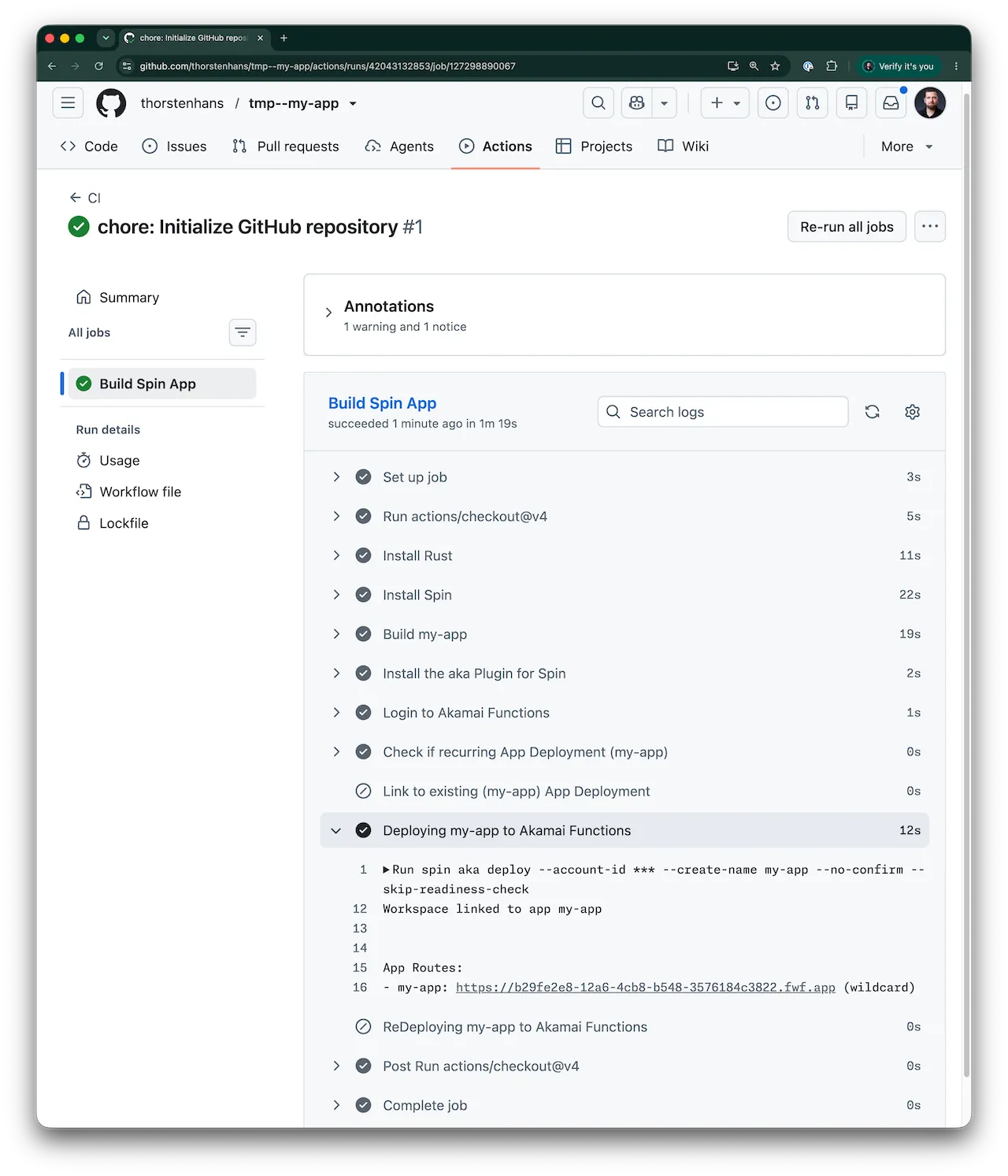
Within a few minutes, you should see your GitHub Actions workflow prefixed with a shiny blue check mark. Looking at the workflow details page, you can spot all tasks being completed successfully (excluding those that are ruled out because it was a first-time deployment in my case):
Keep The Token Fresh
The most common reason for a suddenly failing deploy job is an expired token. Put a reminder in your calendar, create a new token before the old one expires, and update the repository secret with gh secret set.
Recap
A full-fledged GitHub Actions workflow file without having to write the entire YAML plumbing manually. No (fix(ci): Address wrong indentation pt. 2) commits anymore. That’s what you get from using the gh plugin for Spin CLI.