Edge-Accelerated AI: Building Isolated LLM Chatbots with Akamai Functions and Dedicated GPUs

When developers evaluate where to run AI workloads today, the default answer has become “just call a hosted API”. OpenAI, Anthropic, Google — they all offer endpoints you can hit in minutes. But for teams that care about data sovereignty, inference cost control, model selection freedom, or simply want to avoid a single external dependency sitting in the critical path of every user interaction, that default answer deserves scrutiny.
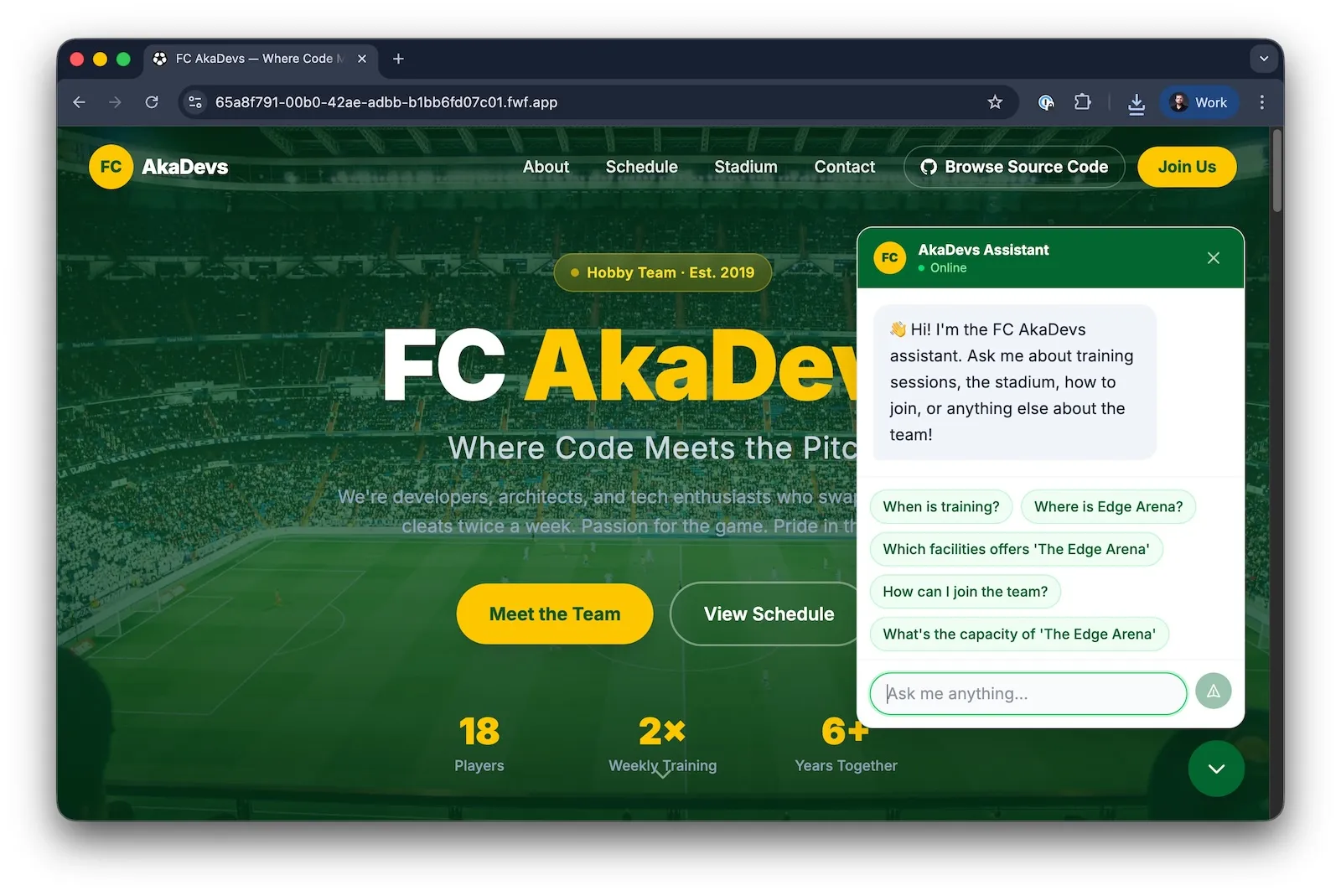
In this article we’ll walk through a sample application that takes a slightly different approach: A globally distributed chatbot running on Akamai Functions, backed by a self-hosted open-source model served by Ollama deployed on a GPU-equipped Linode instance. Edge-enforced defense mechanisms protect the model from abuse, before a single token is wasted.
The Problem With Hosted LLMs
Hosted LLMs are excellent products. No doubt! But they come with trade-offs that matter at production scale:
- Your data leaves your infrastructure. Every message sent to a hosted model is transmitted to a third party. For applications that involve any sensitive domain data — internal knowledge bases, customer records, proprietary processes — this is a compliance and trust issue.
- You are coupled to a model version and provider. API deprecations, pricing changes, and rate limits are outside your control. A model update you didn’t ask for can silently change your application’s behaviour.
- Latency is opaque. You pay a cold-start and network penalty on every request. You can’t cache at the model layer, you can’t co-locate the model with your compute, and you can’t tune the deployment topology.
- Recurring identical queries pay full inference cost every time. In many real-world chatbot deployments, a significant portion of queries are semantically equivalent — the same questions asked by different users. Hosted APIs charge per token regardless.
The architecture described in this post addresses all four of these constraints directly.
Architecture Overview
The application is built on two Akamai primitives and one Akamai infrastructure component:
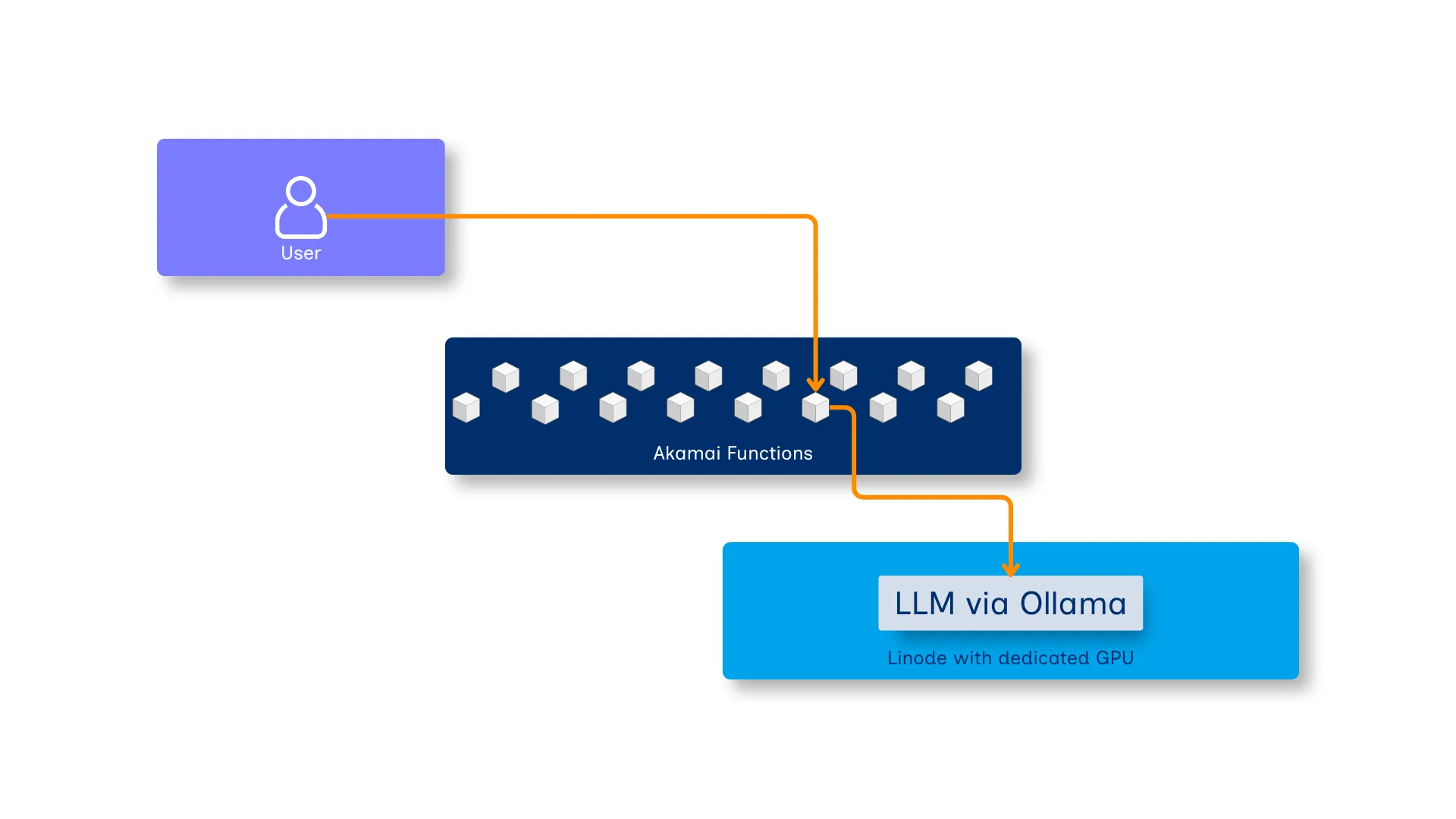
Akamai Functions hosts the entire application as a Spin application, compiled to WebAssembly. The API component is a TypeScript service built with Hono and LangChain.js, bundled and compiled to WASM using wasm32-wasip2. It runs in a truly serverless way, distributed globally across Akamai’s edge network. The frontend component is Single Page Application (SPA) written in Astro. It provides fundamental information about a fictive soccer club and a chat interface, allowing visitors to find answers for their questions about the club. The Astro application is built in the same way you would compile any other Astro app. To serve the frontend from Akamai Functions, it is served by the static fileserver component for Spin.
Akamai Functions’ KV store — The KV store provided on a per-application basis by Akamai Functions — serves two distinct purposes: storing per-session conversation history, and caching LLM responses for semantically equivalent queries. More on that below.
Ollama on a GPU Linode provides the inference backend. A GPU-equipped Linode instance (NVIDIA RTX 4000 Ada) is provisioned via Terraform, bootstrapped with a cloud-init script that:
- installs GPU drivers
- installs Ollama
- pulls the configured model
- exposes the Ollama HTTP API on port
11434
The Terraform and cloud-init provisioning code is included in the repository under infrastructure/.
Why WebAssembly at the Edge?
Spin applications compile to WebAssembly, which makes them a natural fit for edge deployment. WASM binaries are small, start in microseconds, and are sandboxed by design.
The Spin framework adds a component model on top — multiple Wasm components (a frontend fileserver and the API) can share the same origin and the same globally-distributed KV store without any sidecar infrastructure.
For AI applications specifically, this matters because the edge is where you want to do the work that does not require GPU:
- Request Validation
- Session Management
- Caching
- Guardrail Enforcement
Everything that doesn’t need the model should never reach the model.
Edge-Side Response Caching
One of the more underappreciated design decisions in this architecture is the response cache built directly into the edge layer.
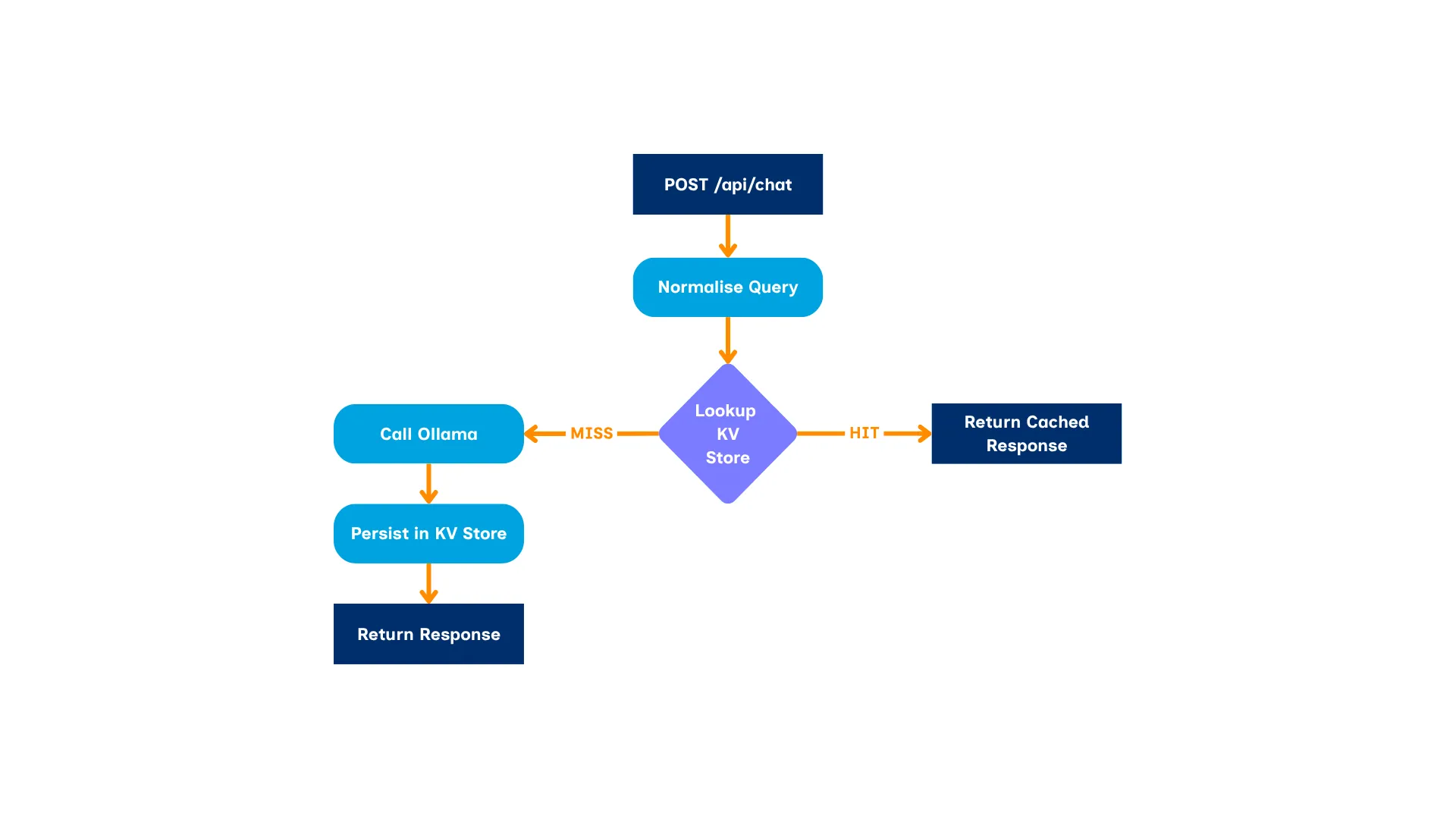
When a user sends a message, the API first normalises the query (lower-casing, stripping punctuation, collapsing whitespaces) and checks the Akamai Functions’ KV store for a prior response to an equivalent question.
If there’s a cache hit, the response is returned immediately — no GPU involved, no Linode round-trip, no inference cost.
This is meaningful in practice. A football club chatbot — like the “FC AkaDevs” demo — will field the same questions repeatedly: “What time is the next training?”, “Which teams exist?”, “Where is the stadium?”.
Once the LLM has answered each of these once, every subsequent identical query is served from memory at the edge with lowest possible latency. GPU time is reserved for genuinely novel queries.
The cache is keyed on the normalised query string only, making it session-independent.
Session State with Akamai Functions
Conversation history is a first-class concern in any LLM chat application. Most implementations either push history back to the client (trusting the browser to hold an accurate message log) or maintain it in a centralized database.
This architecture does neither. History is stored server-side in Akamai Functions’ KV store, keyed by a session ID carried in a SameSite=Strict cookie. The client never transmits history — it cannot inject fabricated prior turns, cannot tamper with the conversation context, and cannot extend its session artificially.
Session history is also capped at 20 messages (10 conversation turns) to prevent unbounded context growth, which would otherwise inflate inference latency and cost on long sessions.
Defense Mechanisms at the Edge
Running an LLM in production without guardrails is an incident waiting to happen. Akamai Functions is the right place to enforce them — before any compute is consumed, before any GPU cycle is spent, before any token reaches the model.
This application implements three layers of protection, all evaluated inside the Spin application running on Akamai Functions, before the request hits Ollama.
1. Input Guardrails
Every incoming message is evaluated against three distinct pattern groups:
Prompt injection detection catches attempts to override the system prompt or impersonate instruction sources. This includes classic jailbreak phrases (“ignore previous instructions”, “you are now”, “do anything now”), attempts to extract the system prompt (“reveal your prompt”, “what are your instructions”), and raw prompt injection markers like <system>, [INST], or ### instruction.
When a match is detected, the request is blocked and the attempt is logged server-side — the user receives a polite message, but the original payload is retained for review.
Secondary-request pivot detection catches messages that embed an off-topic instruction alongside a legitimate question — a common technique for bypassing topic-focused system prompts. Phrases like “by the way”, “while you’re at it”, “could you also”, and “one more thing” are treated as signals of a pivot attempt.
Code injection detection catches requests to generate code regardless of framing. Programming language names paired with coding intent, requests for functions or scripts, and code syntax patterns (backtick blocks, import statements, console.log) are all matched. In a domain-specific chatbot, there is no legitimate reason for the model to write code.
2. Input Length Cap
Messages exceeding 500 characters are rejected at the edge before any pattern matching or inference occurs. This eliminates a class of attacks that rely on volume — long, crafted prompts designed to overwhelm the context window or smuggle instructions past regex-based filters.
3. System Prompt Topic Restriction
The LLM itself receives a strict system prompt constraining it to the application’s domain. Any off-topic question triggers a fixed refusal response from the model layer.
The system prompt also explicitly instructs the model never to reveal its own instructions, providing a second line of defence against extraction attempts that might slip past the pattern matchers.
These three layers are complementary: the guardrails filter out known-bad patterns cheaply, the length cap limits surface area, and the system prompt handles whatever the pattern matchers miss.
From Prompt Stuffing to RAG
The “FC AkaDevs” demo does give the model domain knowledge — but not through RAG. The team facts, training schedule, stadium details, and FAQs are hardcoded directly into the system prompt as plain text. This technique is called prompt stuffing (or static context injection): you author a fixed block of facts once, concatenate it into every system prompt at deploy time, and the model answers from it.
It works fine here because the dataset is tiny and changes rarely. But it has hard limits:
- Context window ceiling. Every fact competes for the same token budget as the conversation itself. A real knowledge base — product documentation, match history, player stats, CRM records — won’t fit.
- No relevance filtering. The entire fact block is injected on every request, whether it’s relevant or not. There’s no mechanism to surface only the facts that actually matter for a given query.
- Static by nature. Updating the knowledge means redeploying the application. Live data — a match result confirmed an hour ago, a last-minute training cancellation — is out of reach.
Retrieval-Augmented Generation (RAG) solves all three. Instead of baking facts into the prompt at deploy time, a retrieval step runs at query time: the incoming message is embedded, a vector store is searched for the most semantically relevant chunks, and only those chunks are injected into the prompt. The model reasons over current, relevant data without ever being fine-tuned on it.
Because the inference backend is self-hosted, there is no data-sovereignty concern with this approach. Document chunks retrieved from your internal knowledge base are injected into a prompt that never leaves your own infrastructure. This is a meaningful advantage over RAG implementations that pipe private documents into a hosted API — your data stays on infrastructure you control, end to end.
The Spin + LangChain.js combination used here supports RAG out of the box — LangChain’s document loader and retrieval chain abstractions work against any OpenAI-compatible endpoint, which the Ollama API implements. Swapping static prompt stuffing for a proper retrieval pipeline is an incremental change to the API component, not an architectural overhaul.
Deploying the Sample Application
Once you have cloned the repository, you must provision the GPU backend first. To successfully provision the infrastructure, you must create a new Personal Access Token (PAT) for Akamai Cloud. When creating the new PAT, ensure the following permissions are assigned:
- Read / Write for Linodes and Firewall
- Read for Events
The Terraform has several variables, allowing you to tailor the infrastructure before actually provisioning it. Although we’ve defined smart defaults, you might want to customize these variables according to your individual needs before applying the Terraform project.
Provision the GPU backend
cd infrastructure

terraform init
export LINODE_TOKEN="your-pat-here"

terraform apply
# → outputs: ollama_endpoint = "http://<linode-ip>:11434"
By default, Terraform will provision a Linode instance with a dedicated GPU in the us-sea region. Via cloud-init it installs Ollama, pulls the configured model, and outputs the public endpoint. It also polls the Ollama health endpoint and only returns after the model is fully loaded — typically 5–12 minutes.
Deploy to Akamai Functions
For compiling and deploying the application to Akamai Functions, you must have the following tools installed on your machine:
- Spin CLI (Spin CLI installation instructions)
- The
akaplugin for Spin (spin plugins update && spin plugins install aka) - Node.js (Node.js installation instructions)
# Authenticate against Akamai Functions
spin aka login

# Compile the application and deploy to Akamai Functions
spin aka deploy --build \
  --variable ollama_url="http://<linode-ip>:11434" \
  --variable secret_sauce="<strong-random-secret>"
As the application comes with an API endpoint that allows you to wipe the cache (/api/cache), you must specify the secret_sauce variable, which must be sent as a X-SecretSauce HTTP header when calling that particular API endpoint.
Run locally against the same backend
spin up --build \
  --variable ollama_url="http://<linode-ip>:11434" \
  --variable secret_sauce="<strong-random-secret>"
Local and production share the same Ollama backend, which simplifies debugging model behaviour without needing a local GPU.
Explore Further
Open sourceReady to RunGrab the full sample code and run it yourself!akamai-developers/akamai-functions-llm-chatbotTry it, clone it, and adapt it to your domain. The architecture scales from a sports club chatbot to any domain-specific AI assistant that needs to run globally, stay fast, and keep its data on infrastructure you control.
Try it nowLive DemoGo and try out LLM ChatBot yourself.LLM ChatBot