GitOps for Spin Apps with SpinKube, Flux and GitHub Actions

Every time I demonstrate SpinKube, someone asks: “Nice, but how do I get this into our existing deployment pipeline?” The short answer: Spin apps don’t need a special pipeline, they ship the same way as every other workload in your cluster.
In this article, I’ll show you the longer answer, using GitOps with Flux: the Spin app and its SpinApp manifest live in one Git repository, a GitHub Actions workflow bumps the image tag on every push, and Flux rolls out whatever Git says.
What You Need To Follow Along
You need a Kubernetes cluster with SpinKube installed. For a local setup, follow the SpinKube Quickstart, as I won’t repeat those steps here. On top of that, you need:
- The
spinCLI (see Spin installation guide) and Node.js - The
fluxCLI (see the Flux installation guide) - A GitHub account
- The GitHub CLI
gh(see cli.github.com)
Personally, I use Homebrew to manage software on my Mac, so installing spin, flux and gh is a one-liner, followed by logging in to GitHub:
# Install spin, gh and flux
brew install spinframework/tap/spin gh fluxcd/tap/flux

# Authenticate against GitHub
gh auth login
Creating The Repository And The Spin App
Both Flux and the CI pipeline will push to a Git repository, so you need one you own. Create the repository with gh and scaffold the app at its root. I use the TypeScript HTTP template here, but any Spin template works:
# Create a new repo
gh repo create gitops-for-spin-apps --public --clone

cd gitops-for-spin-apps

# Create a new Spin application
spin new -t http-ts hello --accept-defaults --output .
I keep app code and deployment config together here. Many teams split them into two repositories, so that a smaller group controls what runs in the cluster, but for a single app one repository is simpler, and the GitOps flow is the same.
If you’d rather skip straight to the finished state, fork the repository linked above instead.
Installing Flux Into The Cluster
A GitHub Token For Flux
flux bootstrap needs a personal access token (PAT) to push its manifests to your repository. With --token-auth, the controllers in the cluster use the same token to pull from the repository over HTTPS, so Flux stores it as a Secret in the flux-system namespace.
Create a fine-grained PAT restricted to your repository, give it a sensible expiry, and grant these repository permissions:
Administration: read-onlyContents: read and writeMetadata: read-only
Then export it in your shell:
# Set your GitHub PAT
export GITHUB_TOKEN=<your-token>
You could use
gh auth tokeninstead, but that’s the token of your wholeghsession. It carries far more permissions than Flux needs, and it stops working when you log out ofgh. A dedicated token is easier to scope, rotate and revoke.
Running flux bootstrap
flux bootstrap installs Flux into the cluster, commits its own manifests to clusters/dev/flux-system, and creates a GitRepository named flux-system that points at your repository:
# Bootstrap Flux
flux bootstrap github \
  --token-auth \
  --owner=<your-github-user> \
  --personal \
  --repository=gitops-for-spin-apps \
  --branch=main \
  --path=./clusters/dev

# Pull latest from origin
git pull
If the repository belongs to an organization, pass the organization as --owner and drop --personal. The git pull fetches the commit Flux just made.
Generating The SpinApp Manifest
The kube plugin for the Spin CLI scaffolds the SpinApp from an image reference, so you don’t have to write it by hand:
# Update the plugin feed
spin plugins update

# Install the kube plugin for spin
spin plugins install kube --yes

# Create the deployment folder
mkdir -p deploy/hello

# Scaffold the SpinApp manifest
spin kube scaffold --from "ghcr.io/<your-github-user>/hello:v1" \
  --out deploy/hello/spinapp.yaml
The result looks like this:
apiVersion: core.spinkube.dev/v1alpha1
kind: SpinApp
metadata:
  name: hello
spec:
  image: "ghcr.io/<your-github-user>/hello:v1"
  executor: containerd-shim-spin
  replicas: 2
The executor refers to the SpinAppExecutor installed with SpinKube. spin kube scaffold has flags for most other fields, such as --replicas, --variable or --image-pull-secret.
Next to it, a plain deploy/hello/kustomization.yaml lists the file:
apiVersion: kustomize.config.k8s.io/v1beta1
kind: Kustomization
resources:
  - spinapp.yaml
Telling Flux What To Deploy
Because app and config share a repository, there’s no need for a second GitRepository. The flux-system source created by bootstrap already tracks it. A Flux Kustomization in clusters/dev/hello.yaml tells Flux which path to apply:
apiVersion: kustomize.toolkit.fluxcd.io/v1
kind: Kustomization
metadata:
  name: hello
  namespace: flux-system
spec:
  interval: 5m
  path: ./deploy/hello
  prune: true
  sourceRef:
    kind: GitRepository
    name: flux-system
  targetNamespace: default
prune: true makes Git the source of truth in both directions: Flux creates what you add to deploy/hello/, and deletes what you remove from it. Delete spinapp.yaml from the repository, and Flux removes the SpinApp from the cluster.
Flux already reconciles everything under clusters/dev, so committing this file registers the app. Don’t commit yet, though: hello:v1 isn’t in the registry so far.
Shipping The First Version
Logging In To ghcr.io
Pushing to GitHub Container Registry requires a token with the write:packages scope. Fine-grained tokens don’t work with ghcr.io, so the Flux token won’t do. Add the scope to your gh login and hand its token to spin registry login:
# Ensure the current token of gh has write:packages scope
gh auth refresh -h github.com -s write:packages

# Authenticate spin CLI
gh auth token | spin registry login ghcr.io \
  -u <your-github-user> --password-stdin
Then build and push the first version:
# Build the Spin app
spin build

# Push it to ghcr.io
spin registry push ghcr.io/<your-github-user>/hello:v1
Making The Image Public
GitHub creates new packages as private, and your cluster has no credentials for ghcr.io. For this demo, make the package public. Open the hello package on GitHub (your profile’s or organization’s Packages tab), go to Package settings, and in the Danger Zone choose Change visibility and Public.
To check that anonymous pulls work, ask ghcr.io for a pull token without credentials. A public package returns a token instead of an error:
curl -s "https://ghcr.io/token?scope=repository:<your-github-user>/hello:pull"For real workloads, keep the package private and give the cluster a pull secret instead, using spin kube scaffold --image-pull-secret.
Deploying With git push
With the image in place, commit and push:
# Commit & Push to GitHub
git add .
git commit -m "hello: initial version"
git push
Flux picks up the change and creates the SpinApp; spin-operator turns it into a Deployment. Watch it with:
# See flux deploying the hello app
flux get kustomizations --watch
kubectl get spinapp hello
Once the SpinApp is ready, spin-operator has also created a Service named hello. Forward a local port to it and call the app:
# Forward local port 8080 to the hello service
kubectl port-forward svc/hello 8080:80

# In a second terminal, call the app
curl localhost:8080
Automating Releases With GitHub Actions
So far, you built and pushed the image by hand. From now on, a GitHub Actions workflow does that on every push to main:
The workflow builds the app, pushes it tagged with the short commit SHA, and bumps the tag in deploy/hello/spinapp.yaml. Flux takes it from there. Put it into .github/workflows/release.yml:
name: Release

on:
  push:
    branches: [main]
    paths-ignore:
      - "deploy/**"
      - "clusters/**"

permissions:
  contents: write
  packages: write

jobs:
  release:
    runs-on: ubuntu-latest
    steps:
      - uses: actions/checkout@v7
      - uses: actions/setup-node@v7
        with:
          node-version: 24
      - uses: fermyon/actions/spin/setup@v1
        with:
          github_token: ${{ secrets.GITHUB_TOKEN }}
      - name: Build and push the app
        run: |
          IMAGE="ghcr.io/${{ github.repository_owner }}/hello:${GITHUB_SHA::7}"
          echo "IMAGE=$IMAGE" >> "$GITHUB_ENV"
          spin build
          echo "${{ secrets.GITHUB_TOKEN }}" | spin registry login ghcr.io \
            -u ${{ github.actor }} --password-stdin
          spin registry push "$IMAGE"
      - name: Bump the image tag
        run: |
          yq -i ".spec.image = \"$IMAGE\"" deploy/hello/spinapp.yaml
          git config user.name "github-actions[bot]"
          git config user.email "41898282+github-actions[bot]@users.noreply.github.com"
          git commit -am "hello: ${GITHUB_SHA::7}"
          git push
Commits pushed with the workflow’s GITHUB_TOKEN don’t trigger new runs, so the tag bump can’t cause a build loop. The paths-ignore filter covers config-only commits you push yourself, like a rollback.
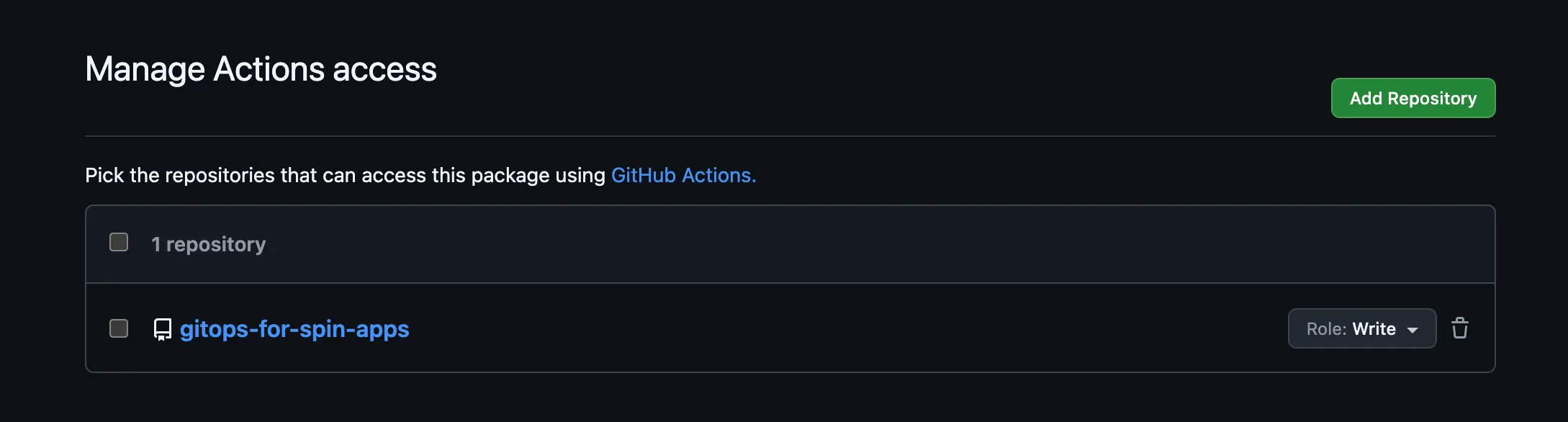
Because you pushed hello:v1 by hand, the workflow isn’t allowed to write to the package yet. In the package settings, under Manage Actions access, add your repository with the Write role.
Now commit the workflow together with a change to the app, for example a new response text in src/index.ts:
# Commit & Push to GitHub
git add .
git commit -m "hello: new greeting"
git push
flux bootstrap configures Flux to check the repository every minute, so the rollout starts shortly after the workflow pushes its tag bump. Once it does, follow it with:
kubectl rollout status deployment/helloRolling Back With git revert
The image tag is just a line in Git, so a rollback is a revert of the commit that bumped it. App commits and tag bumps share one history, so look up the bump instead of reverting HEAD:
# Pull recent changes
git pull
git log --oneline -- deploy/hello/spinapp.yaml
git revert <sha-of-the-bump>
git push
Flux reconciles the previous SpinApp, and the operator rolls back to the previous image. You get the same audit trail and review process you already have for every other workload.
Recap
Keep your Spin app and its SpinApp manifest in one repository, point Flux at the manifest, let a GitHub Actions workflow bump the image tag, and use git revert to roll back. Flux treats a SpinApp like any other resource, so your Wasm apps follow the same GitOps flow as every other workload in the cluster. The only Wasm-specific part is the Spin shim on your nodes, which SpinKube takes care of.