Reusing Wasm Components with spin deps

In HTTP Middlewares with Spin 4.3, we built two middlewares in Rust: auth, which rejects every request without the right bearer token, and gzip, which compresses responses while they stream back to the caller. Neither of them knows anything about the API they protect. Still, both live in the same Spin app as that API, so the next app that needs them would have to copy their sources and build them again. In this article, we publish auth and gzip to an OCI registry and pull them into a fresh app with spin deps add, without touching a single line of Rust.
What You Need To Follow Along
- Spin CLI (version
4.3.0or newer) - The app from HTTP Middlewares with Spin 4.3, or the repository above
wkgfrom the wasm-pkg-tools to publish components.wkg0.16.1 can’t publish compiled components with--package(fixed in #250, not yet released), so install it from the repository for now:cargo install --git https://github.com/bytecodealliance/wasm-pkg-tools wkg- A GitHub account. We publish to the GitHub Container Registry (
ghcr.io)
Where We Left Off
At the end of the previous article, the trigger of our API looked like this:
[[trigger.http]]
route = "/api/..."
component = "api"
dependencies.middleware = [
  { component = "auth", inherit_configuration = ["variables"] },
  { component = "gzip", inherit_configuration = ["variables"] },
]
auth and gzip reference components of the same app. That’s fine for one app, but it couples the middlewares to it: their sources, their build, and their version all live next to the API. Let’s give them a home of their own.
Publishing auth And gzip
A middleware is a regular Spin HTTP component, so there’s nothing special about publishing it. Before wkg can push anything to ghcr.io, though, it needs two things: a GitHub token that is allowed to write packages, and a config that tells it where to push and how to log in.
A Token That Can Write Packages
ghcr.io accepts a GitHub token as password, but only if it carries the write:packages scope. The repo scope doesn’t cover packages. If you use the GitHub CLI, check the scopes of its token:
gh auth status
# - Token scopes: 'gist', 'read:org', 'repo', 'workflow'
If write:packages is missing, add it. gh opens the browser, where you confirm the new permissions:
gh auth refresh -h github.com -s write:packages,read:packagesRun gh auth status again and make sure write:packages shows up. If refresh complains that it “received credentials for” a different account although it’s yours, gh stumbled over the casing of your username. Log out and log in again with the scopes you need instead:
gh auth logout -h github.com
gh auth login -h github.com -s workflow,write:packages,read:packages
Don’t want to touch your gh login? A classic personal access token with the write:packages scope works just as well.
Configuring wkg
First, we make ghcr.io the default registry of wkg:
wkg config --default-registry ghcr.ioNext, we add the credentials. wkg config --edit opens its config file in your $EDITOR:
wkg config --editAdd a section for ghcr.io with your GitHub username and the token (gh auth token prints the one of the GitHub CLI):
default_registry = "ghcr.io"

[registry."ghcr.io".oci]
auth = { username = "<your-github-username>", password = "<token with write:packages>" }
Keep in mind that the token is stored in plain text in that file. Without the section, wkg falls back to the credentials of your Docker config, so a docker login ghcr.io works too, if you already use Docker.
Publishing
Now we build the app and publish each middleware as its own package. A compiled component carries no package name or version of its own, so we pass both with --package:
spin build
wkg publish auth/target/wasm32-wasip2/release/auth.wasm --package thorstenhans:auth@0.1.0
wkg publish gzip/target/wasm32-wasip2/release/gzip.wasm --package thorstenhans:gzip@0.1.0
Replace thorstenhans with your own GitHub username or organization: wkg pushes thorstenhans:auth@0.1.0 to ghcr.io/thorstenhans/auth:0.1.0.
New packages on ghcr.io are private by default.
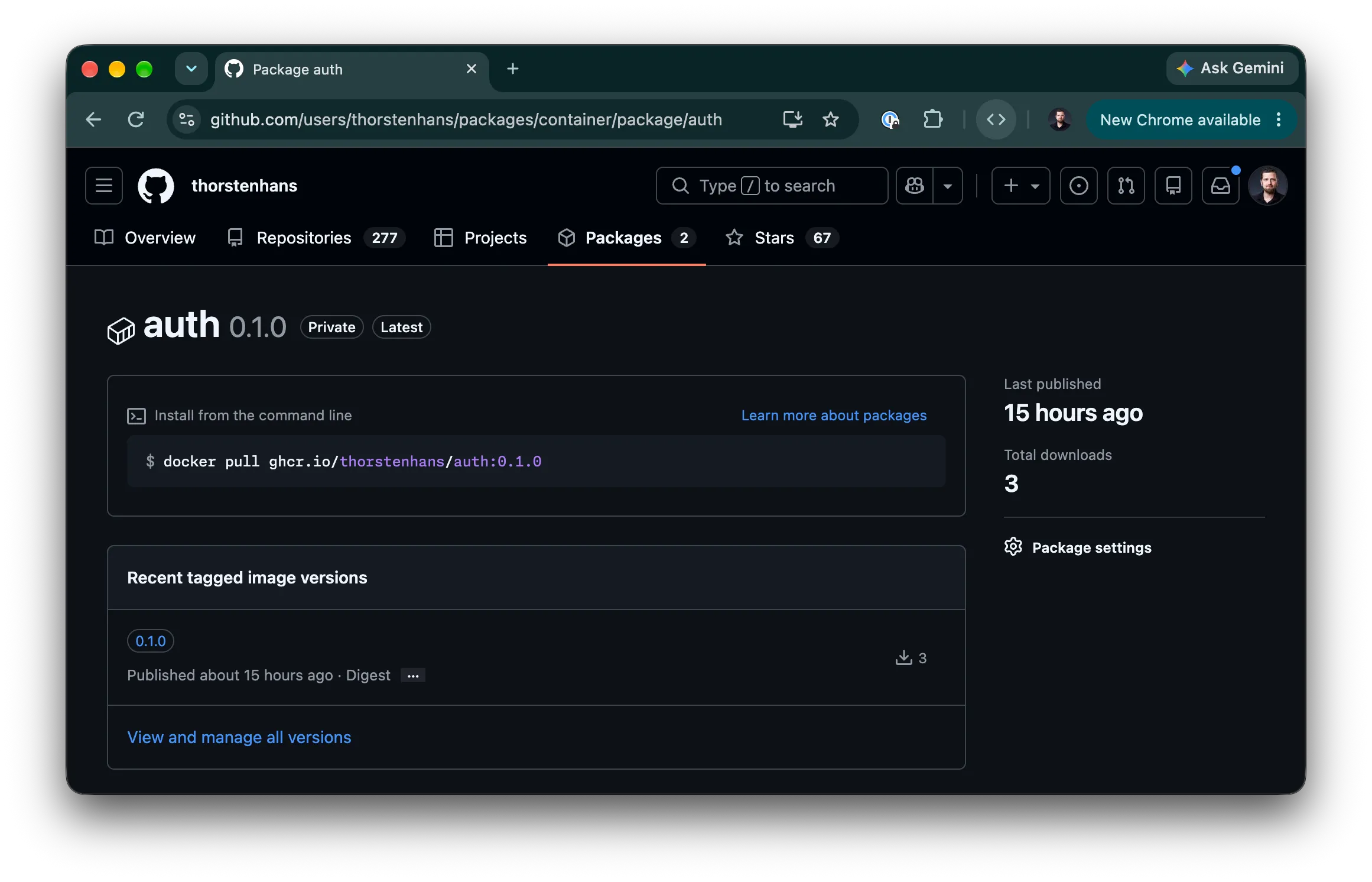
If other people (or a CI pipeline without your credentials) should pull them, switch their visibility to public in the package settings on GitHub. From now on, auth and gzip have their own version history, independent of any app that uses them.
A Fresh App
To prove the point, we start from scratch: a new app with an API component, created the same way as in the previous article.
spin new -E akamai-functions -t http-empty -a reports-app
cd reports-app
spin add -t http-rust -v http-path="/reports/..." -a reports
The middlewares read two variables, so we declare them on the app again:
[variables]
auth_token = { default = "6f1c2e9a-4b7d-4c3e-9a1f-2d8e5b0c7a64", secret = true }
gzip_min_size = { default = "1024" }
Pulling The Middlewares With spin deps add
spin deps (short for spin dependencies) is an interactive way of editing the dependency tables in spin.toml. Its add command takes a source, which is either a local file path, an HTTP(S) URL, or a registry package reference in the form <package>@<version>. --registry overrides your default registry:
spin deps add thorstenhans:auth@0.1.0 --registry ghcr.io
spin deps add thorstenhans:gzip@0.1.0 --registry ghcr.io
Spin pulls the component, detects that it’s HTTP middleware, and attaches it to a trigger instead of a component. Our app has a single trigger (/reports/...), so Spin picks it without asking. In an app with several routes, it would first ask which one the middleware should wrap. Everything else is interactive:
- Position in the pipeline: for the second middleware, Spin also asks where it goes: before
auth, or at the end, closest to the application component. Pick the end, and you get the same order as in the previous article: rejected requests never reachgzip, and only responses fromreportsget compressed. For the first middleware on a trigger, there’s nothing to choose, so Spin skips this question when addingauth. - Capabilities: middleware can’t own capabilities. It inherits them from the component it wraps, and by default it inherits nothing. Spin asks whether the middleware should inherit all, none, or a chosen set of capabilities. Both of ours only need
variables, so choose individually and select just that.
That last prompt writes the same inherit_configuration = ["variables"] we typed by hand in the previous article, so there’s no need to touch spin.toml for it. The prompt offers ai_models, allowed_outbound_hosts, environment, files, key_value_stores, sqlite_databases and variables, and a middleware that is denied a capability fails when it tries to use it at runtime.
The resulting entries land in the dependencies.middleware list of the /reports/... trigger. That list accepts the same sources and options as regular component dependencies, and like everything else spin deps does, you can edit it by hand later.
Mapping The Variables
spin deps add decides which capabilities a middleware inherits, but the values still come from the component it wraps. The middlewares read auth_token and gzip_min_size, so we map both on reports:
[component.reports.variables]
auth_token = "{{ auth_token }}"
gzip_min_size = "{{ gzip_min_size }}"
Testing It
Build and run the app:
spin build
spin up
A request without the token is rejected by auth, which we never compiled in this app:
curl -i localhost:3000/reports/
# HTTP/1.1 401 Unauthorized
With the token, the request reaches reports, and with Accept-Encoding: gzip, responses above the threshold come back with content-encoding: gzip:
curl -s -D - -o /dev/null \
  -H 'Accept-Encoding: gzip' \
  -H 'Authorization: Bearer 6f1c2e9a-4b7d-4c3e-9a1f-2d8e5b0c7a64' \
  localhost:3000/reports/
Versioning
The version is something you decide when publishing: the @0.1.0 in wkg publish --package thorstenhans:auth@0.1.0 is the version of the package in the registry, and the same @0.1.0 is what an app asks for in spin deps add. Each published version stays in the registry, so an app keeps getting exactly the middleware it was built against.
When you fix a bug in auth, publish it under a new version, for example 0.1.1, and update the apps that should get the fix whenever you’re ready. Stick to the usual semantic versioning rules when picking the number, so people consuming your middlewares can tell a bug fix from a breaking change.
Not Just Middleware
spin deps add works the same way for regular component dependencies, the components your code imports through WIT. In that case, Spin asks which component of the app should get the dependency and which interface to import, and spin build generates the language bindings. A registry dependency in spin.toml looks like this:
[component.reports.dependencies]
"thorstenhans:components/classify" = {
  package = "thorstenhans:components", version = "0.1.0", registry = "ghcr.io"
}
The key is the import of your component. version is required, package defaults to the package of the imported interface, and registry defaults to your system’s default registry.
Recap
- Middleware is just a component:
authandgzipare published withwkglike any other Wasm component and get a version history of their own. - One command per middleware:
spin deps add <package>@<version>pulls a middleware from the registry and asks where to place it in a trigger’s pipeline. - Capabilities stay explicit: pulled middleware inherits nothing unless you grant it in the
spin deps addprompt, soauthandgzipgetvariablesand nothing else. - Versions are yours to pick: the version you pass to
wkg publishis what apps reference, and a fix ships as a new version.